
IT monitoring for servers, desktops, laptops and VMs Know before
it breaks.
One console for your servers, workstations, laptops and VMs. IntelixPulse watches them around the clock, explains what is going wrong in plain English, and fixes the routine things safely — with your approval.
- Uptime, metrics and hardware health from a light agent on Windows and Linux
- AI diagnosis that reads the evidence and tells you what to do next
- Alerts on WhatsApp, email, Slack and Microsoft Teams
Free plan: 10 servers, 25 checks, no card, no end date.
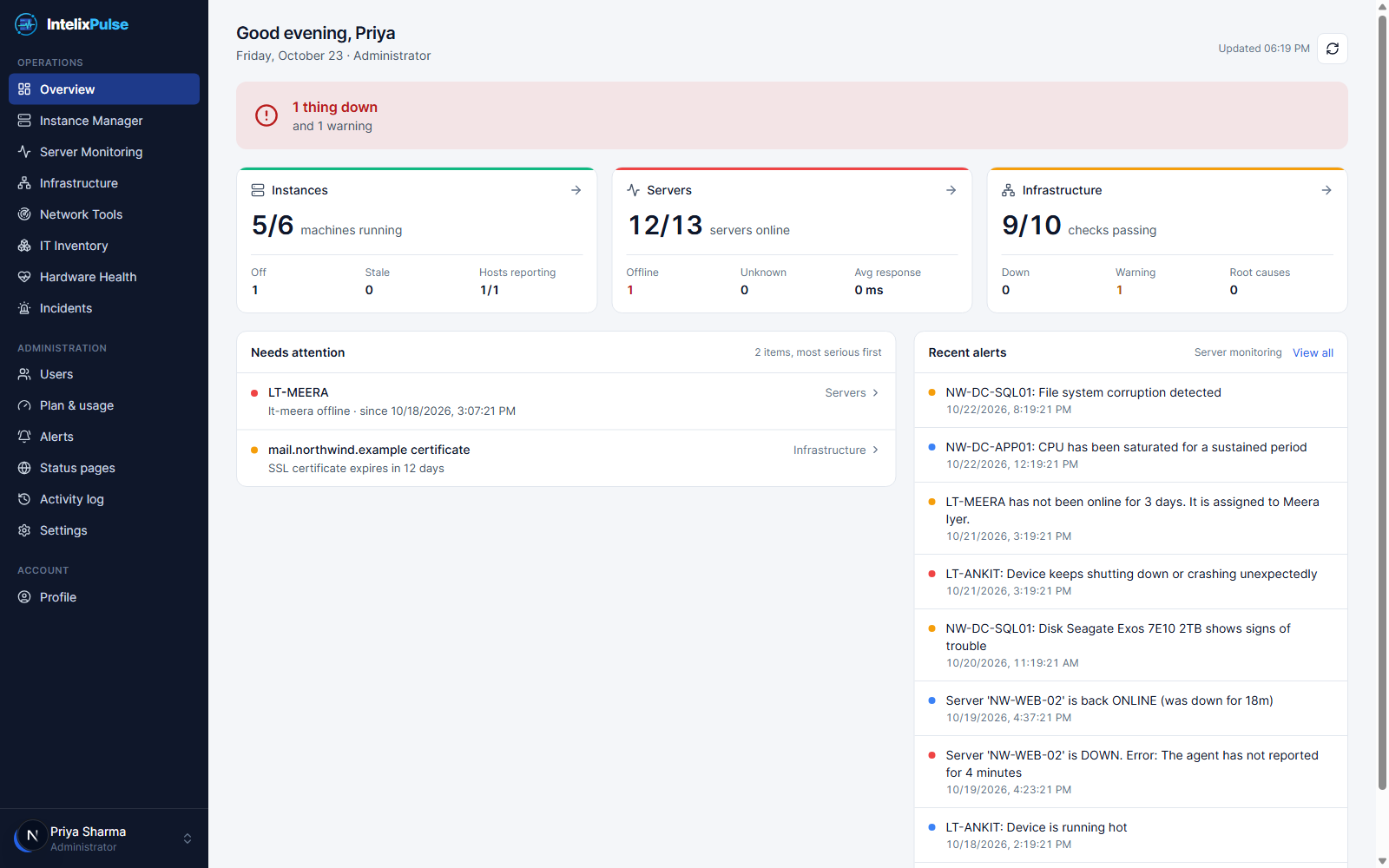
24×7
checks on every server, site and port
6
alert channels, from WhatsApp to Teams
1 line
to install the Linux agent
2-person
approval for remote fixes, if you want it
Monitoring, health, fixes and inventory — in one console
Most IT teams stitch four tools together. IntelixPulse does the watching, the explaining, the fixing and the bookkeeping, for the whole fleet.
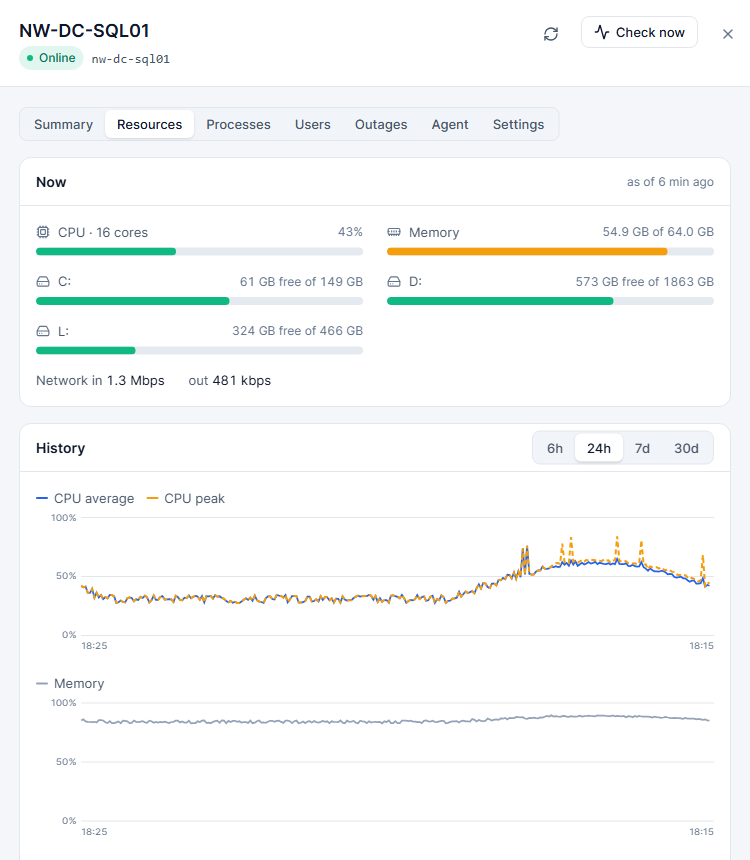
Every server, site and port — watched every minute
Checks from the outside tell you a service is down. The agent on the inside tells you why: the disk that filled, the process that ran away, the network that went quiet.
- Uptime, ping, port and HTTP checksWatch servers, websites, APIs and any TCP port. Response times are charted and every outage is logged with its start, end and duration.
- Live agent metricsCPU, memory, every disk and network adapter, refreshed continuously — with the top processes when something spikes.
- Infrastructure checksGroup checks by dependency so one router going down raises one alert, not forty.
- Up-hours reportMinutes each machine was actually running, per month — ready to back an invoice for hosted servers and VMs.
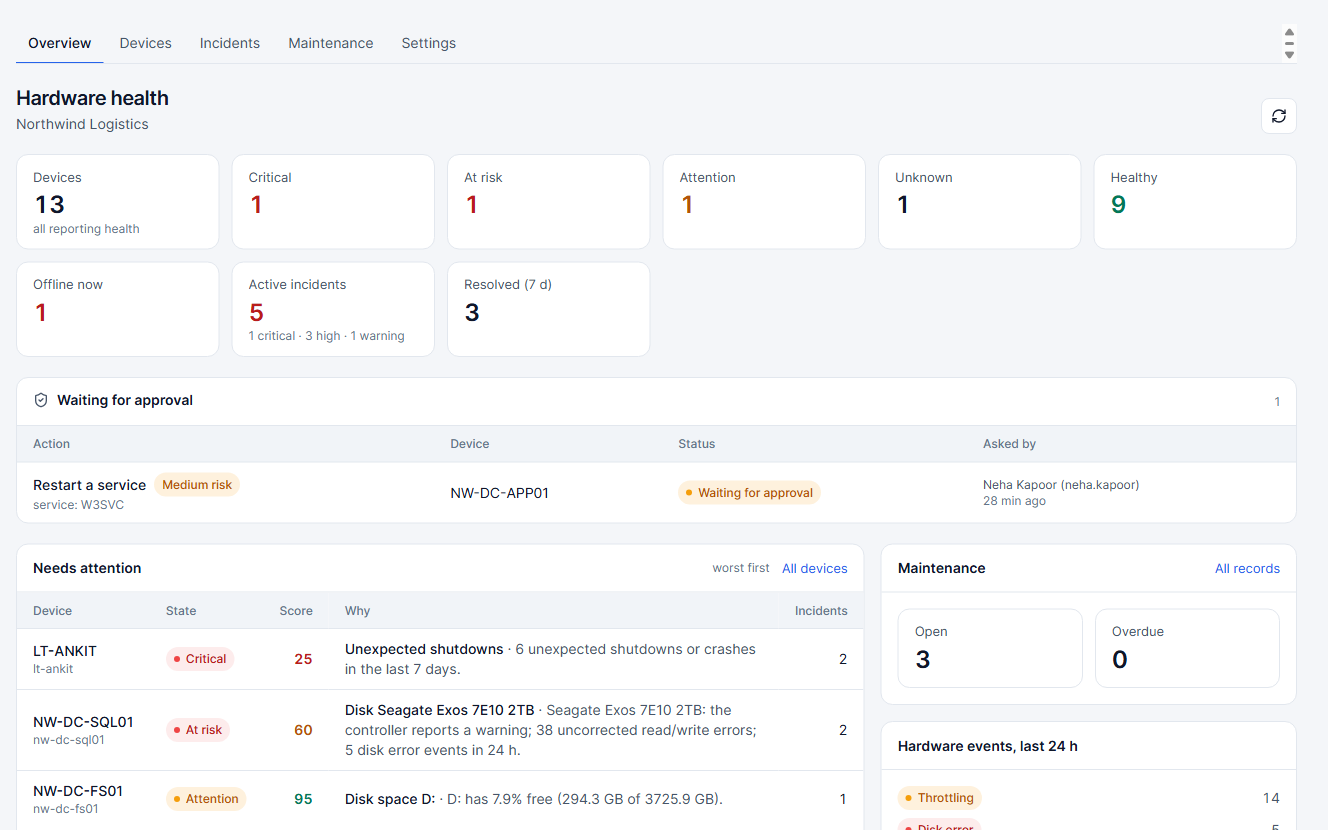
Catch the failing disk before it takes the data with it
The agent reads the signals Windows already keeps — SMART, sensors, battery reports and the event log — and turns them into a health score you can act on.
- Disk SMART and healthReallocated sectors, wear level and media errors on every drive, tracked day by day.
- ThermalsTemperatures that stay high, not just one hot afternoon.
- Battery wearDesign capacity against what the battery holds today, so you replace it before it strands someone.
- Event logs that matterUnexpected shutdowns, file-system corruption and disk errors pulled out of the noise.
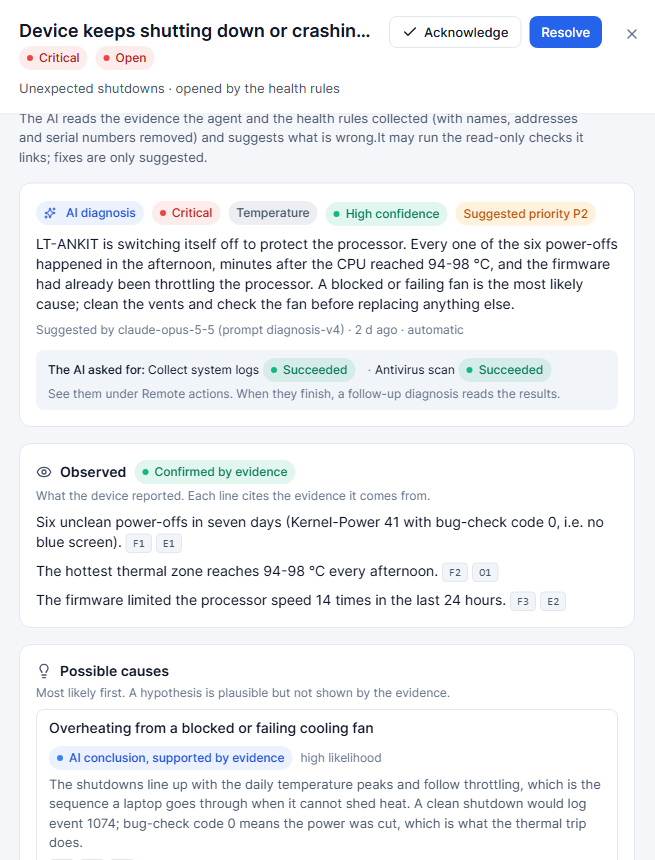
An engineer's read of every incident, in seconds
IntelixPulse hands the incident's evidence to Claude, Anthropic's AI model. It explains the likely cause in plain English, says how confident it is, and lists the next steps — and it can run the checks itself.
Explains from the evidence
Built only from what the agent collected — events, SMART data, metrics — and it cites what it used.
Says how sure it is
Every diagnosis carries a confidence level, so a guess never reads like a fact.
Next steps you can follow
Concrete actions in order, from the quick check to the part to replace.
Runs checks and low-risk fixes
When you allow it, the AI can run read-only checks and low-risk fixes itself — always under your approval rules.
You set the mode
Explain only, run checks, or run checks and low-risk fixes — per company and per department.
Feedback that sticks
Mark a diagnosis helpful or wrong; your team's judgement is recorded with it.
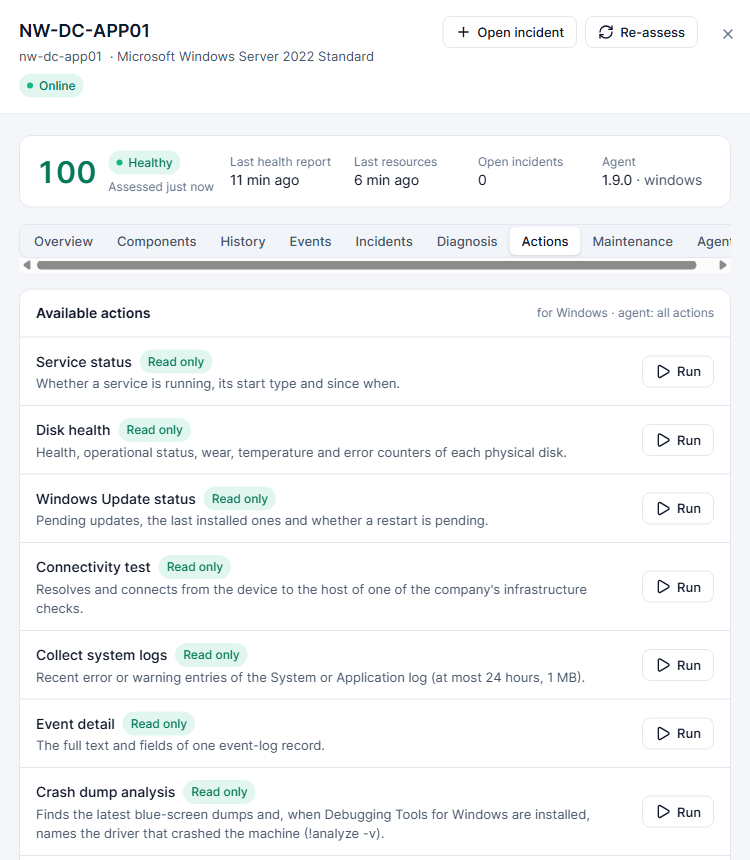
Fix the routine things without remoting in
Run the jobs IT does by hand every week — from one console, on one device or fifty, with approvals and a full record of what ran.
- Defender status and scans
- Temp cleanup
- System file repair
- Crash-dump analysis
- Windows Update and services
- One- or two-person approval
- Queued execution
- Scheduled actions
- One fix, many devices
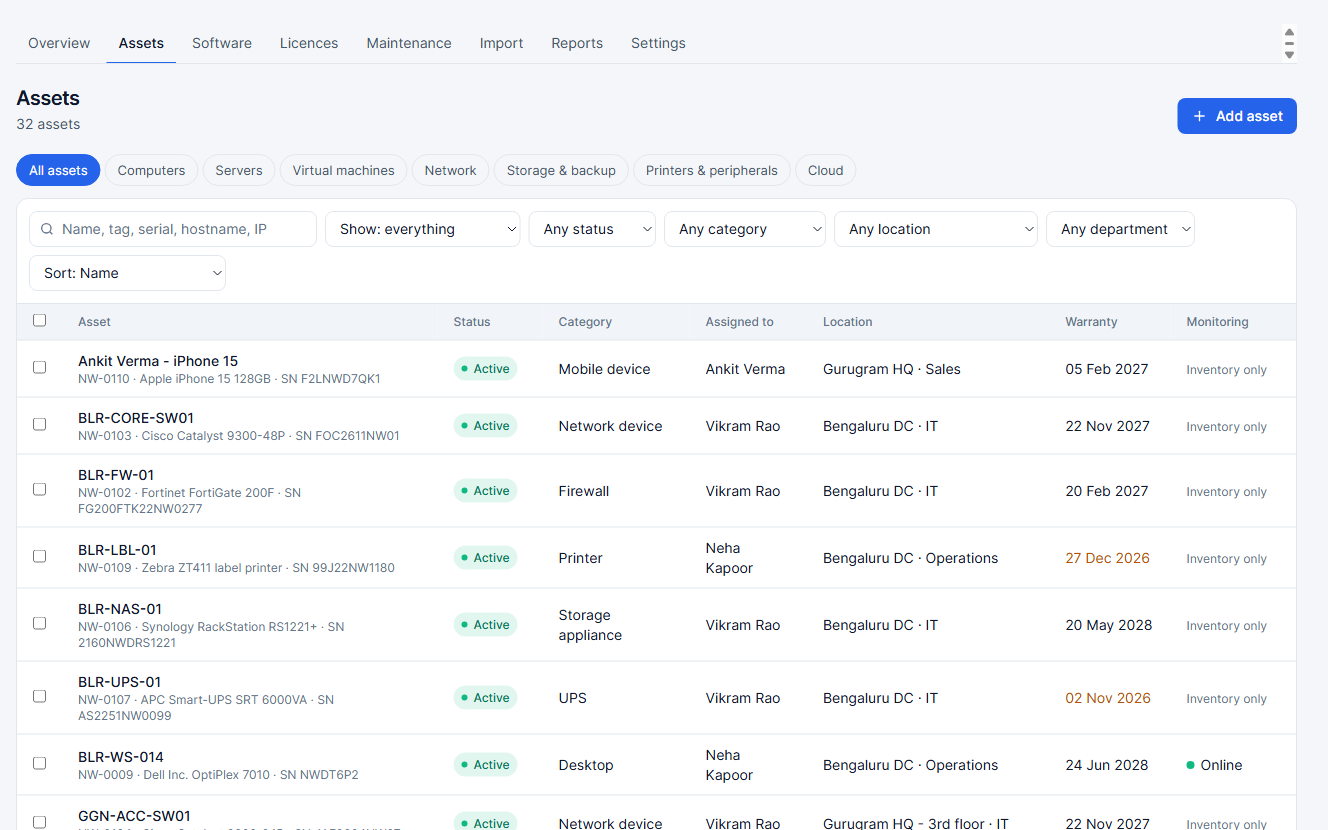
Know what you own, what's installed and what it costs
The agent reports hardware and software as it finds it. Add what it cannot see — monitors, phones, licences — and IntelixPulse keeps the books.
- AssetsEvery machine and peripheral with category, location, department, owner and warranty.
- Installed softwareFound automatically on every device with an agent, grouped by product and version.
- Licences and positionsWhat you bought against what is installed — over or under at a glance.
- Renewal remindersLicences and warranties that expire soon, before they do.
Alerts where your team already is
Down, recovered, critical incident, threat found, device offline for days — routed per department, quiet during maintenance windows.
Maintenance windows
Planned work doesn't page anyone, and the record shows it was planned.
Public status pages
A clean page your customers can check, showing the services you choose.
"Offline for N days" notices
When a device has not checked in for the days you set, IT admins and the person it is assigned to are told.
Live in an afternoon
No servers to install, no appliance to rack. Sign up, drop the agent on your machines and the dashboard fills in.
STEP 01
Create your company
Sign up with email, Google or Apple. You start on the Free plan — no card, no time limit.
STEP 02
Install the agent
Copy your enrollment key, push the MSI with GPO or Intune, or paste one line on Linux.
STEP 03
Set who hears what
Add checks, pick alert channels per department, and let the health scores fill in.
# Windows — silent install for GPO, Intune or any deployment tool
msiexec /i IntelixPulseAgent.msi URL=https://pulse.aptivix.app ENROLLKEY=<your-key> /qn
# Linux — one line, installs as a systemd service
curl -fsSL https://pulse.aptivix.app/api/monitoring/agent/linux/install.sh | sudo bash -s -- --url https://pulse.aptivix.app --key <your-key>
- Company enrollment keys
- MSI and setup.exe for Windows
- One-line install for Linux
- Agent auto-update
Simple monthly plans
Start free and stay free as long as it fits. Business adds hardware health and the full inventory; Enterprise adds AI diagnosis and remote actions.
Free
For trying IntelixPulse on a few servers and sites.
₹0/ month
no card, no time limit
Start free- 5 users
- 10 servers and devices
- 25 uptime checks
- 25 inventory assets
Free includes:
- Uptime, ping, port and HTTP checks
- Agent metrics for Windows and Linux
- Workstations and laptops
- Alerts on email, WhatsApp, Slack and Teams
- Asset register
Business
Most popularFor a growing team watching more of its estate.
₹999/ month
per company · billed monthly · GST extra
Start free, move to Business- 15 users
- 50 servers and devices
- 100 uptime checks
- 250 inventory assets
Everything in Free, plus:
- Hardware health and incidents
- Installed software inventory
- Licences and renewals
- Inventory import
Enterprise
For larger estates and teams, with AI diagnosis and remote actions.
₹4,999/ month
per company · billed monthly · GST extra
Start free, move to Enterprise- 50 users
- 250 servers and devices
- 500 uptime checks
- 2,500 inventory assets
Everything in Business, plus:
- AI diagnosis with Claude
- Remote actions with approvals
- Scheduled actions and fleet-wide fixes
- AI-run checks and low-risk fixes
Every plan includes
- Web console and Android app
- Windows and Linux agents, auto-updating
- Maintenance windows and status pages
- Two-step sign-in and activity log
- Department policies
- Enrollment keys, MSI and setup.exe
- Data hosted in India
- Onboarding help from our team
More than 250 devices, or need custom terms? Talk to us.
Questions IT teams ask us
What do I need to install?
Nothing for uptime, ping, port and HTTP checks — they run from our side. For metrics, hardware health, inventory and remote actions, install the IntelixPulse agent: an MSI or setup.exe on Windows (silent install for GPO or Intune) or one command on Linux. It runs as a service and updates itself.
Is the Free plan a trial?
No. The Free plan has no end date and needs no card: 5 users, 10 servers, 25 checks and 25 assets. Move to Business or Enterprise from the console when you outgrow it.
Does the AI change things on my machines by itself?
Only if you let it. By default the AI only explains. You can allow it to run read-only checks, or checks and low-risk fixes — and those still follow your approval rules and the device's safety setting. Everything it runs is in the activity log.
Which AI model does the diagnosis use?
Claude, by Anthropic. It sees the evidence for the incident (events, SMART data, metrics) — not your files — and explains the likely cause, its confidence and the next steps.
Will my laptops spam us with down alerts?
No. Devices marked as laptops never raise down alerts. Instead, when one has not checked in for the number of days you set, IT admins and the assigned user get an "offline for N days" notice.
Where do alerts go?
Email, WhatsApp, Slack, Microsoft Teams, the in-app inbox and the Android app. Department policies decide who hears about which devices, and maintenance windows keep planned work quiet.
Can we require two people to approve a remote fix?
Yes. Choose one-person or two-person approval per action, and set a safety level on each device. Jobs for a busy or offline device wait in a queue rather than failing.
Which operating systems does the agent support?
Windows (servers, desktops and laptops) and Linux servers. Anything with an address — routers, firewalls, printers, websites — can still be watched with ping, port and HTTP checks.
Where is our data kept?
IntelixPulse runs on servers in India. Each company's data is separate, and our support team can see your account only when you grant support access.
See your whole estate on one screen — today.
Create your company, install the agent on a few machines and watch the dashboard fill in. The Free plan has no end date.